Over the past two months, I released the first batch of localizations for GitByBit, letting roughly 10% of the planet learn Git in the best possible way, all in their native languages:
Style and tone
When writing GitByBit and later translating it, I aimed for two things:
- a friendly, informal tone;
- the day-to-day tech lingo developers actually use among themselves.
I couldn’t rely on the official Git docs as my main reference because, as it turns out, they often sound too formal and translate terms that real developers prefer to keep in English or transliterate.
Some passages even read like lightly edited early machine translation. That may partly be a consequence of how fragmented the documentation ecosystem is: different resources and languages have been maintained by different community projects over many years, without a single editorial voice spanning all of them. The result is hit-or-miss quality and terminology that doesn’t always match how developers actually talk.
In the real world, non-English-speaking devs use a mix of English, translated terms, and local slang. The proportions vary between languages—and even between countries that share a language. Spanish developers in Spain, Mexico, and Argentina, for example, may use different slang and idioms. In Spanish, one team may talk about el área de staging, while another calls it el área de preparación (“preparation area”). One keeps tag in English; another translates it as etiqueta (“label”).
That lack of a single correct answer drove me crazy until I accepted that no translation would ever be perfect. At the end of the day, you’re mostly translating for people whose English gets in the way of learning. Those who are entirely comfortable in English may choose the original from the start. Aim to make the translation clearer, livelier, and more human than the official docs. That’s a pragmatic and achievable goal.
Forget perfection! But do thorough research, make educated guesses when usage is ambiguous, and keep your choices consistent. Then ship the translation, hope for the best, and improve it in response to user feedback.
Your PT-BR version of the GitByBit is perfect. I couldn’t write it any better, you can continue displaying it to everyone
— Ivã S.

Language as a result of collective choices
It’s fascinating how language evolves in seemingly random directions thanks to collective human choices. Let’s take Spanish and Portuguese. Both are very similar in terms of linguistic constructions and vocabulary. Both have been exposed to Git for 20 years. Yet over time, their developer communities settled on different conventions for Git terminology.
In Spanish, branch becomes rama, the everyday word for a branch of a tree. Fun fact: rama probably doesn’t mean anything to you as an English speaker until you hear the word ramification and realize that they both come from the same Latin root ramus, which means—you guessed it—“branch.”
On the other hand, most Portuguese-speaking devs like to say branch in English, even though a tree branch would be a ramo (also galho) in Portuguese. Go figure!
When we say commit, push, and merge in English, we rarely think of them as both nouns and verbs; in English, it doesn’t matter much. But in many languages, including our four, nouns and verbs have very different features. For example, nouns have grammatical gender, and verbs change form.
This creates another point of divergence between Spanish and Portuguese. In Spain, developers commonly put the Spanish verb hacer (“to do” or “to make”) in front of a plain English term: hacer commit, hacer push, and hacer un merge. To an English ear, they sound roughly like “make commit,” “make push,” and “make a merge.”
But in Brazil, they prefer to say commitar and mergear, and then conjugate them as native Portuguese words: mergeei means “I merged,” and mergeamos means “we merged.” The English nouns have been swallowed whole by Portuguese grammar. Push took a third route: dar um push, literally “give a push.”
Both languages are capable of borrowing words. Spanish speakers can turn the borrowed words into verbs, such as commitear, while Portuguese speakers can say fazer um commit (“make a commit”). Both languages have the same linguistic tools. What differs is which forms their developer communities have collectively made sound natural.
Even when a term stays in English, the surrounding language quickly claims it. It gets an article, a grammatical gender, a plural, and sometimes a whole family of new verbs. For example, a pull request is feminine in Spanish: la pull request. In Portuguese, it’s masculine: o pull request. There are also tricky choices. For example, Spanish devs are divided over the gender of the word terminal.
To me, this project was a great illustration of how a living language is driven by people rather than designed from a rulebook. Sometimes there is a clear reason why one expression wins; sometimes two closely related languages take the same English word in different directions for no apparent reason at all. Get that choice wrong, and the course may still be understandable, but it will not sound like the people it was written for.
Gender traps
Addressing the learner creates another problem when you want the translation to sound informal.
The English word you is awesome because it doesn’t care about gender, number, or formality. You use the same word in all these cases:
- gender: a man or a woman
- number: a single person or a group
- formality: a close friend or a president
Our four languages do care about these distinctions, although each reveals them in different ways. First, you have to choose the right form of address:
- Spanish distinguishes informal tú, formal usted, and several plural forms;
- Portuguese distinguishes singular você from plural vocês;
- Ukrainian uses informal singular ти and plural or formal ви;
- Russian makes the same distinction with ты and вы.
In GitByBit, I deliberately address the learner as a friend, so I use the informal singular form in each language: tú, você, ти, and ты.
Those informal pronouns are not gendered on their own, but other words attached to them often are. As a result, some perfectly ordinary sentences force you to decide on a gender where English leaves it unspecified. For example:
- English: You’re ready
- Spanish: Estás listo when addressing a man, or Estás lista when addressing a woman.
- Portuguese: Você está pronto, or Você está pronta.
- Ukrainian: Ти готовий, or Ти готова.
- Russian: Ты готов, or Ты готова.
With English, you have just one gender-neutral option, but every direct translation presents two options, and if you pick either, the text sounds as if it were written specifically for a man or a woman.
Ukrainian and Russian add another trap: past-tense verbs also change with gender:
- English: You created your first commit.
- Ukrainian: Ти створив свій перший коміт or ти створила свій перший коміт.
- Russian: Ты создал свой первый коммит or Ты создала свой первый коммит.
Luckily, Spanish and Portuguese don’t have this particular problem:
- Spanish: Has creado tu primer commit.
- Portuguese: Você criou seu primeiro commit.
The blunt solution to this problem is to switch to plural or formal address, but it would make a friendly one-to-one course sound distant or as if it were addressing a room. Instead, I kept the informal voice and changed the structure of the sentence during translation.
Here is a real example from the course. The English source says:
Awesome job! You’ve completed the second chapter of the course. Now you’re ready to create your first repository and start pushing changes to it. Let’s go!
That innocent-looking source contains two traps. Let me show you how to dodge these problems.
Trap 1: you’ve completed becomes a gendered past-tense verb in Ukrainian and Russian
- English (before): You’ve completed the second chapter of the course.
- English (after): The second chapter of the course is behind us.
The rewrite makes the chapter the subject and removes the past-tense action from the learner:
- Ukrainian: Другий розділ курсу позаду.
- Russian: Вторая глава курса позади.
Trap 2: ready becomes a gendered adjective in all four languages
- English (before): Now you’re ready to create your first repository.
- English (after): Now you can create your first repository.
The rewrite removes ready, so there is no adjective that has to describe the learner as male or female:
- Spanish: Ya puedes crear tu primer repositorio.
- Portuguese: Agora já pode criar seu primeiro repositório.
- Ukrainian: Тепер можна створити перший репозиторій.
- Russian: Теперь можно создавать первый репозиторий.
The rewritten sentence avoids the traps, doesn’t leak gender, and still sounds informal in translation. Here’s the full rewrite in English:
Awesome job! The second chapter of the course is behind us. Now you can create your first repository and start pushing changes to it. Let’s go!
Ambiguous pronouns
Small English pronouns often force a translator to make a real decision. Consider this example:
I found the bug in the function and fixed it.
The translator first has to decide what it means. Here, it refers to the bug, not the function. That tiny pronoun creates two different traps.
Trap 1: Ukrainian drops the object completely
- Ukrainian (before): Я знайшов баг у функції й виправив.
- Ukrainian (after): Я знайшов баг у функції й виправив його.
The verb виправив in the first version hangs in the air: fixed what? The second version restores його (“it”) and points it back to the bug.
Trap 2: Spanish attaches the pronoun to the wrong noun
- Spanish (before): Encontré el error en la función y la corregí.
- Spanish (after): Encontré el error en la función y lo corregí.
La points to la función, so the sentence says “I fixed the function.” The intended referent is el error, which requires lo.
A better fix: rewrite the English source
- English (before): I found the bug in the function and fixed it.
- English (after): I found and fixed the bug in the function.
The rewrite is shorter and makes the bug the explicit object of both verbs. It also translates cleanly:
- Ukrainian: Я знайшов і виправив баг у функції.
- Spanish: Encontré y corregí el error en la función.
The source is clearer, and neither translator has to decide what it means.
Translating jokes
Oh, this is a minefield. When writing something in English, you rarely stop to consider whether a particular joke or idiom can survive translation. I had to go back and add many comments to the source:
- explaining the essence of a joke so future translators can come up with an equivalent;
- providing a neutral fallback when a good equivalent is impossible.
Here is a simple example from one of the course quizzes. It asks who created Git and offers several possible answers, including a deliberately absurd one. The joke only works if the comedian is familiar to the audience. Louis C.K. is well known in the English-speaking world, but much less familiar to audiences in Ukraine. A literal translation would preserve every word and lose most of the joke. Thankfully, the Ukrainian version has a great cultural substitution:

— No, but he wrote the jokes for these quizzes!
Not every joke gets such a happy ending. Another quiz asks what happens when you commit changes in Git. The English version adds a fifth answer that turns commit into romantic commitment, followed by a punchline about a Git dating app.
Ukrainian borrows commit (коміт) as a technical term, but the word doesn’t carry that second meaning. Translating the answer literally would make it sound completely random, while explaining the English wordplay would kill the joke. So the Ukrainian version simply drops it:
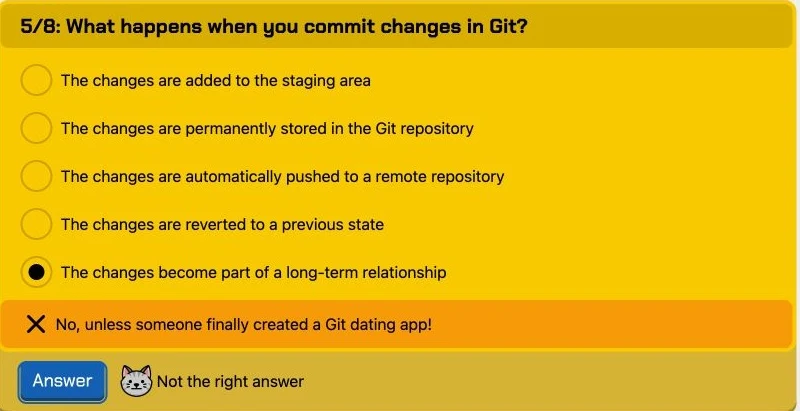
— No, unless someone finally created a Git dating app!
Sometimes that is the only honest option. A slightly less funny course is still better than a course that regularly makes the learner wonder, “Wait, was that supposed to be funny?” It seems that localization is full of choices like this. None of them is perfect or final, but GitByBit now sounds much closer to the developers it speaks to—and that matters far more than matching the English source word for word.
Good news! The first batch of localizations for GitByBit is ready!
If you're interested in specific technical details or the glossary, email me at alex@githowto.com. If you spot any issues, either email me directly or open an issue on GitHub.
You've spent hours learning and practicing, but all you've got is... a decent skill boost.
Nonsense! Humans need closure. That's why I'm excited to announce that GitByBit now offers certificates of completion for users who finish the main course and all the practices.

Before departing, he needed closure too.
Your shiny certificate is available in the Focused Practice menu as soon as you reach the end of the last practice.
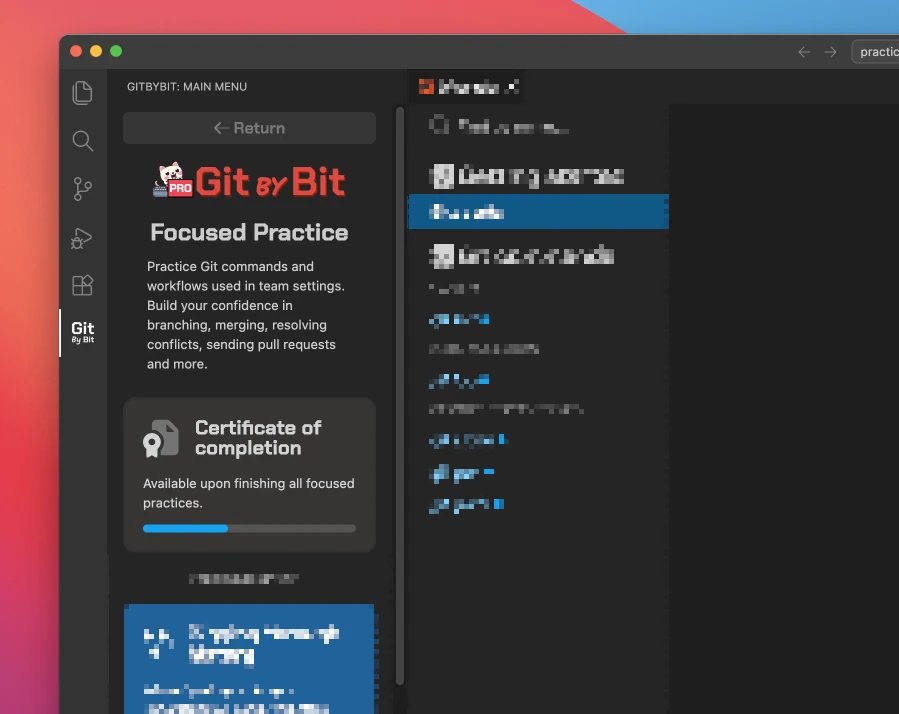
From there, you'll land on a page where you can download your certificate as a PDF. It includes your name, the date, and a static URL, so anyone can access and verify it.