GitByBit Winter Logo

Become
GitByBit
PRO

Unlock the complete GitByBit experience

Extra content

Get access to a whole new section with 20+ lessons that let you practice advanced Git commands and workflows useful in real-world projects.

Team-focused

Practice Git commands and workflows used in team settings. Build your confidence in branching, merging, resolving conflicts, sending pull requests, and more.

One-time payment
Accepting all major payment methods
30-day money-back guarantee

Extra practice

These focused practices prepare you for the real-world Git hurdles you'll encounter on the job. Build confidence and muscle memory so you won't get embarrassed in a team setting. You'll also learn how to perform the same tasks in the graphical interface of VS Code or Cursor.

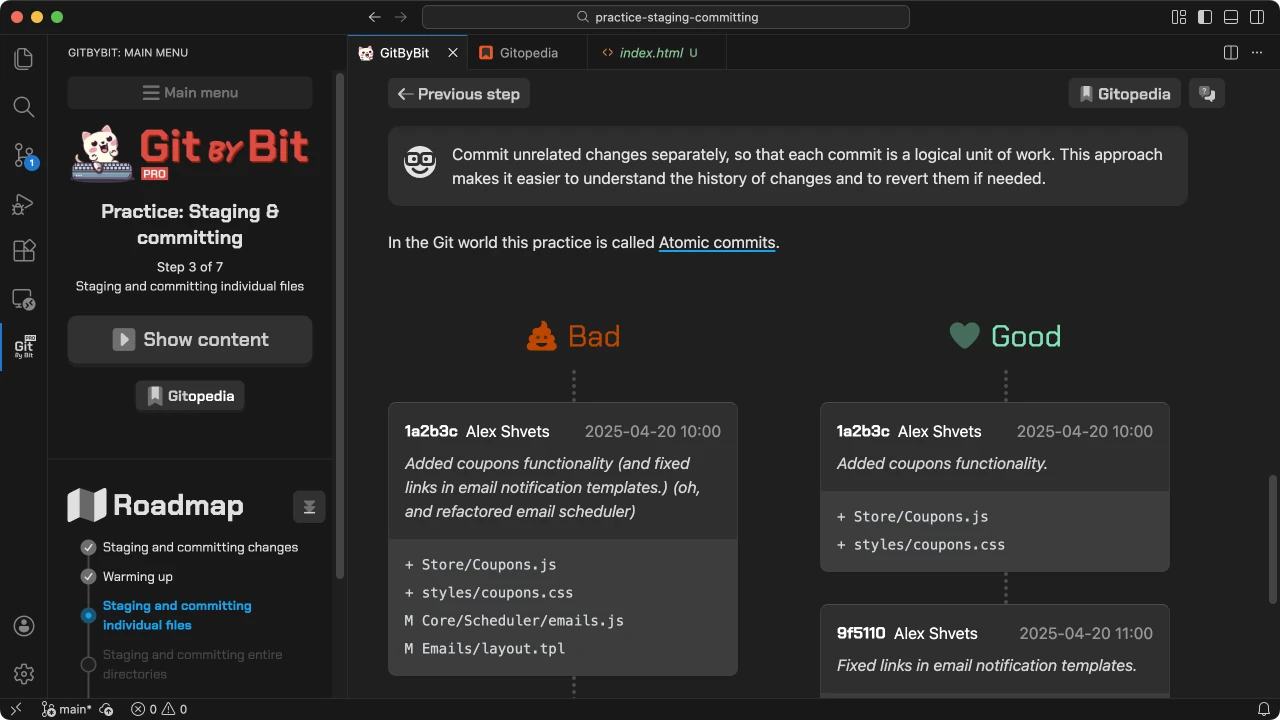
Staging & committing: explaining atomic commits.
1 / 15
Staging & committing

90% of working with Git is adding stuff under version control. Build muscle memory for putting changes under version control until it becomes second nature. Learn to make precise commits that tell a clear story of your work. You'll also discover best practices for writing commit messages.

6 concepts & commands
Cleaning the working directory

Real-life development can be messy. Projects may get cluttered with stray edits and files that slip in by accident. Practice cleaning the working directory of unwanted or unintended changes. You'll also learn about .gitignore, git stash, and other techniques to keep your workspace clean and organized.

5 concepts & commands
Digging through history

When figuring out bugs or understanding code, you often need to look back in time. Who made a change, when, and why? Practice finding specific changes in the project history. Put on a detective hat in a realistic multi-year codebase and trace edits the way developers actually do. Also learn about git blame, every developer's favorite Git command.

5 concepts & commands
Merging, rebasing, and resolving conflicts

Working on a team is easy until you need to combine everyone’s changes. Learn about different merge and rebase strategies, when to use each, and how to recover from mistakes. Practice resolving merge conflicts before they turn into a full-blown code brawl. Also learn about git reflog, every Git pro's secret recovery tool.

6 concepts & commands
Contributing with pull requests

Have you ever needed to fix a bug in a third-party library or add a feature to an open-source project? Practice contributing to projects on GitHub using the pull-request workflow. Go through every step: fork a repository, create a feature branch, make changes, submit a pull request, respond to feedback, and resolve merge conflicts. Also learn to sync your fork and keep reviewers in the loop.

6 concepts & commands
One-time payment
Accepting all major payment methods
30-day money-back guarantee

A perfect gift

Know someone who's starting their coding journey? A son, nephew, friend, or colleague?
Give them the gift of confidence with GitByBit PRO. It's a practical and thoughtful present that will help them master Git and set them up for success in their software development career.

  1. Press the button below to start the gift purchase process. During checkout, you enter your own billing details, which stay private.
  2. After finishing the purchase, you'll be able to enter the recipient's email address along with an optional personal message (you can remain anonymous if you wish).
  3. You can send the gift immediately or schedule it for a later date.
  4. Once the gift is sent, the recipient will get an email that contains your personal message (if any) along with instructions on how to activate their GitByBit PRO license.

Frequently Asked Questions

GitByBit is primarily built for folks who are new to Git, or have been using Git as a magical black box without really understanding how it works.

Many developers use Git for years, but working with small clients, doing solo projects, or relying only on GUI tools can still leave gaps in their understanding. They might be new to collaborating in teams, handling merge conflicts, or creating a proper pull request. This course fills in those gaps and builds a solid foundation—especially with the PRO version.

I've structured the course so that more advanced developers can quickly skim the early content and skip through to the parts that are new to them.

GitByBit is designed to teach command-line Git first and foremost, because that's where the real power of Git lies. However, the course also instructs you on how to perform the same tasks in the graphical user interface, if possible.

It's hard to tell, since everyone learns at a different pace. However, on average, it takes about 4-8 hours to complete the main course. The PRO version adds another 2-3 hours of focused practice.

GitByBit is platform-agnostic and works equally well on Windows, Mac, and Linux. All Git commands covered in the course are the same across all operating systems.

Yes! Once you've purchased GitByBit PRO and signed in to your account in VS Code, all course content is available offline. You can learn and practice Git commands without an internet connection.

Nope! It's a one-time purchase. When you buy GitByBit PRO, you'll have access to the course for the lifetime of the product. Not only that, but you'll get all updates and improvements for free!
  • Credit/debit cards: Visa, MasterCard, AmEx, Discover, JCB, and more.
  • PayPal
  • Apple Pay, Google Pay
  • iDeal
  • NetBanking
  • WeChat Pay and Alipay
  • Crypto
Absolutely! You can purchase multiple licenses using the regular checkout page and then distribute them to your team members. A volume discount of 10%, 15%, and 20% applies when you buy 5+, 15+, or 30+ copies respectively.
Yes! You will be able to download the invoice after purchase. If you purchase as a company, your business details, VAT ID, etc. will be included in the invoice.

Yes! As with my other projects, I plan to translate the course into several languages to cover a wider audience. If you buy the PRO now, you'll get access to the new translations free of charge as they become available.

However, translations take time and resources, so they will be rolled out gradually. If you are interested in helping with reviewing upcoming translations, please contact me at support@gitbybit.com.

Any questions or feedback?

Hi, I'm Alexander Shvets, the author of GitByBit and Refactoring.Guru

If you have any questions or feedback about the course, feel free to contact me via email support@gitbybit.com. I'm always happy to help with any issues you might have, and I'm open to suggestions on how to improve the course.

One-time payment
Accepting all major payment methods
30-day money-back guarantee
© 2024-2026 GitByBit.All rights reserved.